Scraping Tabular Data with Pandas
Web Scraping using Python and Pandas


Web Scraping is a technique to fetch data from websites. BeautifulSoup and Scrapy are the two widely used libraries in Python to perform Web Scraping. However, working with these libraries can be cumbersome since we need to find the element tags, extract text from them, and then clean the data.
This article will show guide you to an easy way of extracting tabular data using Pandas. Yes! Pandas!
Extracting tables from HTML page
For this tutorial, we will extract the details of the Top 10 Billionaires in the world from this Wikipedia Page.
We will use the read_html method of Pandas library to read the HTML tables.
import pandas as pd

url = 'https://en.wikipedia.org/wiki/The_World%27s_Billionaires'

df_list = pd.read_html(url)
This script returns HTML tables into a list of DataFrame objects.
Let’s check the total number of tables found:
len(df_list)

# Output:
# 32
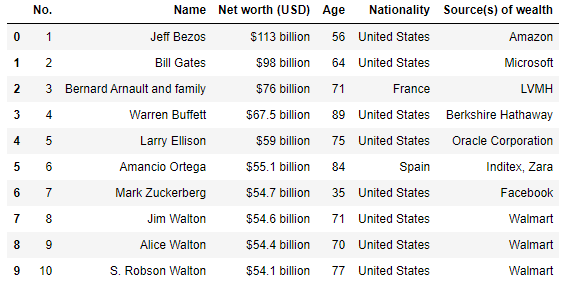
To access a particular table, simply access that element of the list.
For example, df_list[2] will return the following table:
Set a particular column as an index
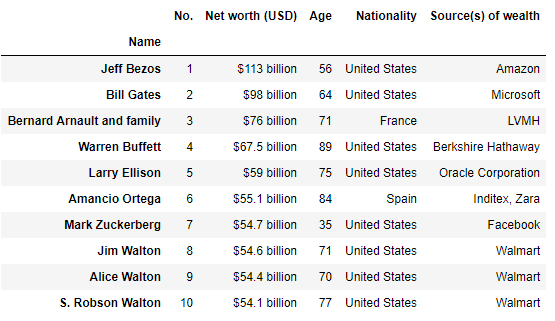
We can select a particular column to the index of the table by using the index_col parameter.
Example:
pd.read_html(url, index_col=1)[2]returns the following table:
Return tables containing a string or regex
We can also specify to return the list of tables containing a particular string or a regular expression by using the match parameter.
Example:
pd.read_html(url, match='Number and combined net worth of billionaires by year')[0].head()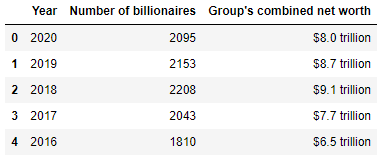
Specify strings to recognize as NA/NaN
We can specify the list of strings to recognize as NA/NaN by using the na_values parameter.
Example:
without specifying na_values :
pd.read_html(url)[0].tail()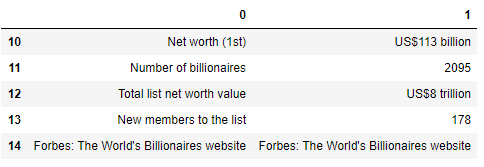
after specifying na_values :
pd.read_html(
    url,
    na_values=["Forbes: The World's Billionaires website"]
    )[0].tail()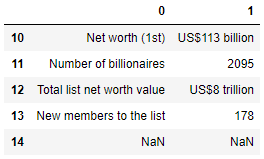
Other Parameters
skiprows parameter allows us to skip the starting ‘n’ rows
header parameter can be used to make the specified row as the column header
Example:
pd.read_html(url, skiprows=3, header=0)[0].head()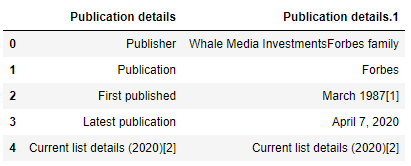
Conclusion
In this article, we learned how to easily scrape HTML tables from pages using the read_html method. Also, we learned some of the important parameters which can further help us in scraping the desired table.
References
Resources
The code snippets used in this article are available on my GitHub page.
Let’s Connect
LinkedIn: https://www.linkedin.com/in/jimit105/
GitHub: https://github.com/jimit105
Twitter: https://twitter.com/jimit105